Enterprise Cloud Computing Guide for Modern Businesses
Explore enterprise cloud computing guide covering benefits, architectures, migration, security, cost, vendors, and hiring strategies to drive agile innovation.


Public cloud accounted for 45% of enterprise IT spending in 2026, up from 17% in 2021, according to a cloud statistics summary citing Gartner (cloud computing statistics for 2026). That shift reflects more than a change in hosting preferences. It shows that infrastructure has become part of business strategy, affecting product delivery, resilience, security, data architecture, and the engineers a company must hire.
A familiar problem sits behind many cloud programs. A product team has a promising release, but its test environment depends on a slow hardware request. A database upgrade requires a maintenance window. Capacity planning meetings consume time because nobody can provision resources without waiting for procurement and operations. Leaders know the business needs faster experimentation, yet the existing environment rewards caution because every change touches tightly coupled systems.
Enterprise cloud computing offers a different operating model. Organizations consume computing resources as services, automate provisioning, distribute workloads across suitable environments, and build teams around continuous delivery rather than hardware ownership. The technology alone won't solve every problem, but a well-designed cloud strategy can connect architecture, governance, and hiring into one practical roadmap.
Table of Contents
Introduction to Enterprise Cloud Computing
History and Core Concept of Cloud - The four service models
Business Benefits of Cloud Adoption - Cost efficiency with accountability - Agility and delivery throughput - Resilience and scale
Common Architectures and Service Models - Choosing between hybrid and multi-cloud
Migration Strategies and Cost Optimization - A phased migration path - Keeping consumption under control
Security Models and Compliance Considerations - Build compliance into the platform
Vendor Landscape and Hiring Implications - Match staffing to delivery risk
Conclusion and Next Steps
Introduction to Enterprise Cloud Computing
A technology leader facing legacy infrastructure often sees the same pattern: developers finish code, then wait for environments; operations teams protect fragile systems through manual controls; finance receives cloud or data-center costs without enough workload context to explain them. The business wants speed, but the infrastructure makes every launch feel like a negotiation.
Cloud adoption has moved far beyond experimental projects. 94% of enterprises use cloud services in some form, and large enterprises account for over half of global cloud market share in 2025, according to enterprise cloud adoption statistics. For major organizations, cloud is increasingly a default operating model for infrastructure, platforms, and business software.
That doesn't mean every workload belongs in a public cloud or that migration automatically creates value. A poorly planned move can transfer technical debt into a new billing model, create identity gaps, or leave teams responsible for platforms they don't understand. Enterprise cloud computing works when leaders make deliberate choices about placement, service boundaries, security ownership, operating processes, and skills.
Practical rule: Treat cloud as an organizational capability, not a data-center relocation project.
The useful questions are therefore broader than “Which provider should we choose?” Leaders need to understand how cloud services evolved, where the business value comes from, which architectures fit different workloads, how to migrate without losing control, and how team structure must change afterward. Those decisions determine whether cloud becomes a foundation for resilient products or another layer of complexity.
History and Core Concept of Cloud
Modern enterprise cloud computing has a clear commercial starting point. Amazon Web Services launched S3 on March 14, 2006, and EC2 on August 25, 2006, making storage and virtual servers available on demand. S3 debuted at $0.15 per GB-month, while EC2 offered virtual servers at $0.10 per server-hour, as documented in this history of the 2006 S3 and EC2 launch.
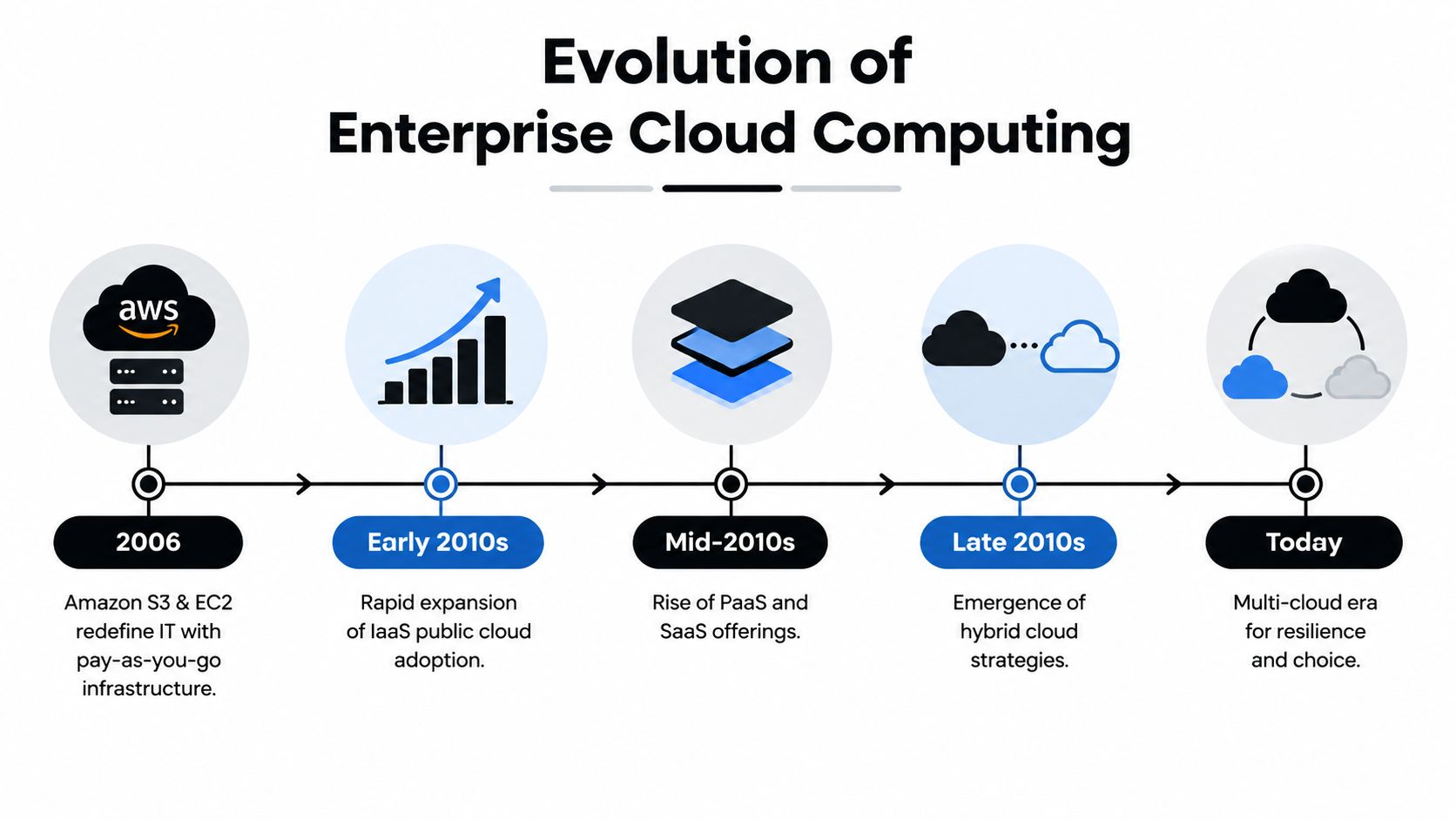
The important innovation wasn't only the price. AWS changed the unit of infrastructure consumption. Instead of purchasing servers, installing them, and estimating future capacity, a team could request computing resources when needed and release them when demand fell. That pay-as-you-go pattern helped turn infrastructure into a scalable commercial utility.
The four service models
Cloud terminology becomes easier when you separate what the provider manages from what the customer controls.
Infrastructure as a Service, or IaaS: The provider supplies virtual machines, networks, and storage. Your team manages operating systems, runtime configuration, applications, and much of the security configuration. IaaS suits workloads that need control, such as custom databases or applications with unusual operating-system requirements.
Platform as a Service, or PaaS: The provider manages more of the runtime platform, allowing developers to focus on application code and data. Managed application platforms and database services reduce operational work, but they also impose service constraints.
Software as a Service, or SaaS: The provider operates the complete application. Customers configure users, workflows, and data rather than maintaining the underlying platform. Salesforce, Microsoft 365, and many business systems fit this model.
Hybrid cloud: The organization connects private infrastructure or a private cloud with public cloud resources. Sensitive systems, latency-sensitive services, or regulated data can remain in a controlled environment while elastic workloads use public capacity.
Enterprise cloud computing also includes multi-cloud, where an organization uses services from more than one public provider. Multi-cloud can support geographic, commercial, or capability requirements, but it introduces more identity systems, networking patterns, skills requirements, and operational interfaces. It should solve a specific business problem, not become an automatic symbol of maturity.
Business Benefits of Cloud Adoption
Cloud adoption creates value when it solves a measurable operating problem. Moving a server to a provider does not automatically reduce spending. The gain comes from improving provisioning, resource utilization, resilience, delivery speed, or access to managed capabilities.
Cost efficiency with accountability
Cloud changes infrastructure economics by letting teams consume capacity instead of purchasing all of it in advance. Resource pooling and managed services can reduce physical maintenance work, while usage-based billing connects a workload more closely to its operating cost.
Flexibility can also produce waste. Idle environments, oversized databases, unmanaged data transfer, and duplicated services make bills difficult to explain. A sound business case therefore includes tagging, clear ownership, budgets, anomaly alerts, and regular reviews of actual workload behavior. Cost optimization belongs to engineering operations as well as procurement.
Agility and delivery throughput
Infrastructure as code, automated pipelines, containers, and managed databases give teams repeatable environments. Developers can test an architectural change without waiting for hardware, and operations teams can apply the same configuration across development, testing, and production. The path from an approved idea to a working release becomes shorter.
That speed affects the wider organization. Product teams can test customer-facing changes earlier, data teams can provision analytical resources for a defined purpose, and security teams can place controls inside delivery workflows. Safe change becomes routine when the platform and operating model support it.
Cloud skills also change how teams are organized. Engineers who once maintained servers may spend more time on automation, platform services, reliability, and governance. Organizations need clear ownership between product teams and platform teams, along with hiring plans that cover infrastructure as code, observability, security, and cost management. A cloud migration can therefore change roles and collaboration patterns, not just hosting location.
Resilience and scale
Cloud architecture supports deliberate distribution of services, backups, and recovery mechanisms. Teams can design for failure by separating application components, automating replacement, and testing recovery instead of assuming one environment will remain healthy indefinitely.
Scalability still depends on sound design. Stateless services, queues, caching, and elastic resource allocation help systems respond to variable demand, while capacity testing and careful data design prevent those patterns from masking bottlenecks. The provider supplies options. Engineers choose how to combine them.
The spending shift described earlier reflects the strategic importance of these capabilities. Public cloud is projected to represent a much larger share of enterprise IT spending than it did previously, according to the cited cloud spending summary. The projection does not mean every workload belongs in public cloud. It does explain why cloud fluency now matters to product, finance, security, and hiring decisions.
An executive review should ask:
Cost: Which expenses will disappear, and which consumption costs need controls?
Performance: Which response-time or throughput requirements shape the design?
Scalability: Which demand patterns justify elastic capacity?
Compliance: Which data and operational controls must remain verifiable?
Common Architectures and Service Models
Service models describe the provider-customer boundary. Architecture describes how applications, data, networks, and environments work together. Confusing the two causes design problems. A company can use SaaS in a hybrid strategy, or run IaaS across a multi-cloud topology.
Service Model | Description | Ideal Use Case |
|---|---|---|
IaaS | Virtualized compute, storage, and networking with substantial customer control | Custom applications, specialized operating systems, and workloads requiring infrastructure-level configuration |
PaaS | Managed runtime and development services that reduce platform administration | New applications, APIs, event-driven workloads, and teams focused on product code |
SaaS | Complete provider-operated business software accessed through configuration and administration | Collaboration, CRM, finance, HR, and other standardized business functions |
Public cloud generally favors speed and elasticity. Private cloud offers greater control over placement and operating boundaries. Hybrid architecture connects the two, often because an enterprise must balance compliance, latency, existing investments, and demand variability.
Placement deserves more attention than it usually receives. A peer-reviewed study of enterprise hybrid clouds reported that latency-aware workload placement reduced costs by 27.80% compared with all-in-Tokyo placement and 12.74% compared with all-in-NOVA placement, while maintaining response-time constraints (the hybrid-cloud placement study). The lesson is architectural: region selection, locality, latency, and cost should be optimized together.
Choosing between hybrid and multi-cloud
Hybrid cloud is useful when a workload has a reason to span environments. A regulated data store might remain in a private environment while a public cloud handles elastic application processing. A factory system might keep control traffic near the plant while sending selected analytics to a public platform.
Multi-cloud can provide provider choice or access to specialized services, but portability has limits. Applications that depend heavily on one provider's identity, database, messaging, or AI services may be expensive to move. Leaders should document the portability they need, then accept deliberate coupling where a managed service creates enough value.
For teams designing modern services, this guide to cloud-native architecture provides a useful companion to decisions about containers, service boundaries, automation, and platform responsibilities. The key principle remains simple: choose the service model and topology that match the workload's control, latency, compliance, and operating needs.
Migration Strategies and Cost Optimization
A successful migration starts with inventory, not a provider contract. Leaders need a current view of applications, dependencies, data flows, owners, recovery requirements, and operational pain. Without that map, teams often move systems in isolation and discover too late that an apparently simple application depends on a fragile database, a fixed network path, or an undocumented batch process.
A phased migration path
Assessment establishes scope. Classify workloads by business importance, technical complexity, data sensitivity, and dependency risk. Some applications should be retired, some rehosted, and others redesigned. The classification should also identify the team accountable for operating each system after migration.
Pilot turns assumptions into evidence. Select a small, non-critical workload that exercises the intended identity, networking, deployment, monitoring, and cost controls. A pilot should test the operating model, not merely prove that a virtual machine can start.
Migration execution requires a deliberate strategy. Lift-and-shift moves an application with limited modification and can reduce initial disruption. Cloud-native rearchitecture changes application boundaries, storage patterns, scaling behavior, and deployment automation to take advantage of the target platform.
A 2025 comparative analysis reported that refactored applications averaged 34% faster response times and 47% higher throughput than lift-and-shift alternatives, as described in the comparative cloud application analysis. Those figures shouldn't be treated as a promise for every migration. They illustrate why the migration decision is architectural, not merely logistical.
Optimization and rollout begins after production cutover. Teams should review resource utilization, service dependencies, alerts, recovery procedures, and user experience. Successful pilots can then expand through repeatable patterns rather than one-off engineering work.
Keeping consumption under control
Cost optimization works best when engineers can see how design choices affect spend.
Rightsize resources: Match compute and database capacity to observed workload behavior, while preserving performance and recovery requirements.
Schedule nonproduction systems: Shut down development and test resources when teams don't need them, using automation rather than manual reminders.
Use commitment carefully: Reserved capacity or committed-use arrangements can lower unit costs when demand is predictable, but they shouldn't replace workload analysis.
Optimize placement: Evaluate region, locality, data transfer, and latency together. A cheaper region can create higher application or network costs.
Review managed services: A managed service may reduce operational effort, but teams should understand pricing dimensions, retention behavior, and scaling triggers.
For a more detailed operating checklist, use these cloud cost optimization strategies. The broader rule is to make cost visible during design, not after finance reports an unexpected bill.
Security Models and Compliance Considerations
Cloud security doesn't mean the provider secures everything, and it doesn't mean the customer must reproduce an entire data center security program alone. The shared responsibility model divides obligations between provider and customer, and the boundary changes according to the service type. The UK National Cyber Security Centre explains that customer duties vary across IaaS, PaaS, and SaaS depending on the service and provider implementation (its guidance on cloud security responsibilities).

With IaaS, the customer typically carries more responsibility for operating systems, applications, configurations, identities, and data. PaaS shifts more platform maintenance to the provider, but customers still control application logic, access, data handling, and configuration. SaaS reduces infrastructure administration, yet user permissions, information governance, and tenant configuration remain important customer duties.
Build compliance into the platform
Data residency means data must be stored within a defined geographic boundary, such as a national border. Requirements can come from law, industry standards, certifications, or contract terms, as explained in Microsoft's paper on data residency and sovereignty. Architecture teams should map where data is created, processed, replicated, backed up, and accessed.
A practical control set includes:
Identity: Use centralized identity, least privilege, strong authentication, and short-lived access where possible.
Data protection: Encrypt data in transit and at rest, then manage keys and access as separate governance concerns.
Continuous verification: Add security tests, dependency checks, and configuration validation to CI/CD pipelines.
Evidence: Automate audit records, policy checks, and control reporting so compliance isn't rebuilt manually before every review.
Security teams also need explicit availability objectives. Leaders comparing recovery design and uptime expectations may find Overvue's perspective on uptime goals useful when translating business impact into technical targets. DevSecOps practices can then connect those targets to delivery workflows through DevSecOps integration guidance.
Vendor Landscape and Hiring Implications
AWS, Microsoft Azure, and Google Cloud Platform offer broad infrastructure, data, security, and application services. Specialist providers can add value in areas such as hybrid management, edge computing, industry compliance, or AI-focused infrastructure. The right decision depends less on a universal ranking than on existing skills, enterprise agreements, data location, service requirements, and the amount of platform coupling the organization accepts.
A useful evaluation starts with workload evidence:
AWS: Consider its broad service catalog, mature infrastructure patterns, and fit with teams already experienced in AWS operations.
Azure: Examine Microsoft identity, productivity, and enterprise integration requirements alongside application needs.
GCP: Assess data engineering, analytics, machine learning, and container-oriented operating models.
Specialist platforms: Evaluate them for a defined requirement, such as edge locality, hybrid control, or specialized AI capacity.
Vendor choice changes the hiring profile. An enterprise needs architects who can establish boundaries and migration patterns, platform engineers who create reusable internal capabilities, DevOps engineers who automate delivery, SREs who manage reliability, and cloud security specialists who enforce identity and policy. Data engineers and AI engineers become increasingly important when cloud modernization depends on usable data rather than infrastructure alone.
Match staffing to delivery risk
Permanent hiring suits capabilities the organization will operate for years, such as platform ownership, security engineering, and reliability leadership. Staff augmentation can add expertise during migration waves, specialized integration, or a temporary delivery surge. Managed teams can help when a company needs an outcome but doesn't yet have the internal operating model to own every function.
Hiring quality matters because cloud work is highly contextual. A résumé may list AWS, Azure, Kubernetes, Terraform, or observability tools, yet the candidate still needs to reason about failure modes, identity boundaries, cost behavior, and team interfaces. Cloud-native architect roles illustrate why architecture hiring should test design judgment, not only product familiarity.
TekRecruiter is one staffing option for companies that need cloud, DevOps, SRE, platform, data, or AI engineering talent. Its engineer-to-engineer recruiting model uses technical conversations to match candidates with roles, and its delivery options include direct hire, staff augmentation, on-demand access, and managed services. Team design should follow the roadmap: hire permanent owners for enduring capabilities, then augment specialist capacity where migration timing or risk makes internal hiring too slow.
Conclusion and Next Steps
Enterprise cloud computing is a continuing operating model, not a one-time infrastructure project. The strongest programs connect service-model choices to workload needs, use phased migration to control risk, redesign applications where the business case supports it, and treat security, residency, reliability, and cost as architecture concerns.
The people plan matters just as much. Cloud architects, platform engineers, DevOps specialists, SREs, security experts, data engineers, and AI engineers must work through clear ownership boundaries. Without those capabilities, organizations can adopt advanced services without gaining the operational benefits they expected.
Start by inventorying workloads, identifying the business outcomes that matter, and defining the skills required to operate the target environment. Then build a pilot that produces technical and financial evidence before expanding the program.
TekRecruiter helps leading companies deploy the top 1% of engineers anywhere, including cloud, DevOps, platform, data, and AI specialists for enterprise modernization. Visit TekRecruiter to discuss direct hire, staff augmentation, on-demand engineering support, or a managed team for your cloud initiative.